Free icon pack · Three styles
25 Free Artificial Intelligence Icons in Three Styles
Original guide published August 27, 2026. Source updated September 26, 2026. English edition October 10, 2026 · By Lienzo.
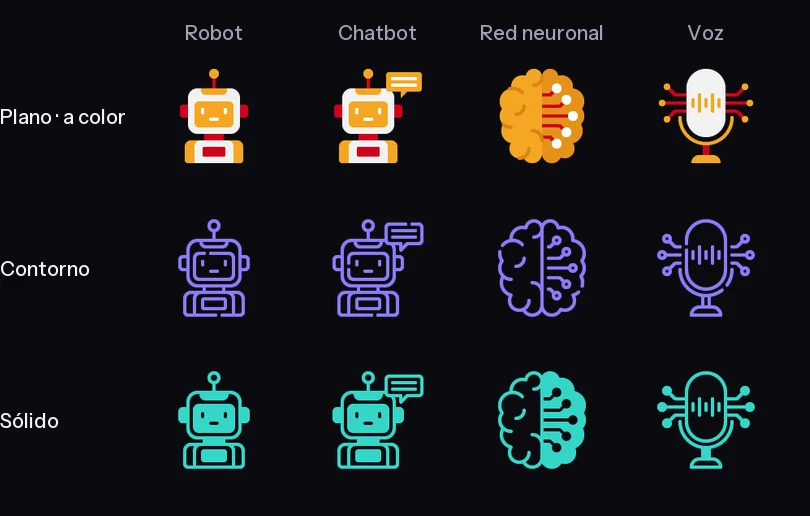
Choose a visual style without losing the concepts your interface needs. This pack offers 25 artificial intelligence icons in flat color, outline, and solid styles. Each concept appears in all three styles. Filenames and folders remain in Spanish.
Compare the three styles
Preview twelve outline icons
What's included
- 75 SVGs and 75 PNGs: 25 concepts × three styles × two formats, for 150 graphic files.
- SVG folders:
svg/plano,svg/contorno, andsvg/solido. PNGs are 128 px in all three styles. - A Spanish
LEEME.txt. The credits sheet is a separate download.
The source preparation record reports 15% lower SVG weight. The archive remains unchanged for this English edition.
Concepts covered
Algorithms, AI ethics, AI and predictive models, knowledge graphs, big data, machine learning, deep learning, data analysis, mining and visualization, computer vision, image and voice recognition, natural language, chatbots, assistants, robots, interfaces, neural networks, automation, autonomous driving, cloud computing, AR, and VR.
Choose an artificial intelligence icon for your layout
This is an AI-themed icon pack, not an AI icon generator. It contains 25 concepts in three matching styles: 75 SVG files and 75 PNG files. Use the same style across a feature list or navigation area to keep the interface consistent.
Choose SVG for scalable web graphics and editable vector artwork. Choose the included 128 px PNG when your application does not support SVG. Keep the original Spanish folder names when following the file examples below, and test the icon beside its label at the size your visitors will see.
Download the AI icons
Original ZIP: approximately 0.25 MB. Download without signing up, then extract the three style folders. Keep Spanish names such as red-neuronal.svg, chatbot.svg, and vision-por-computadora.svg when following the examples.
Download the original ZIP · 0.25 MB ↗
Choose a style at its real size
Flat color gives a hero section or presentation a distinct visual anchor. Outline fits labeled features and menus. Solid can hold its silhouette better in compact controls, but check every symbol at the intended size rather than assuming it will work as a favicon.


These real files are in svg/plano/robot.svg, svg/contorno/chatbot.svg, and svg/solido/red-neuronal.svg. Keep a visible label for every action.
Show an icon beside a label
Copy the pack's svg folder beside your HTML file. The image retains its file color. An empty alt avoids repeating the adjacent label.
<p>
  <img src="svg/contorno/robot.svg" alt="" width="24" height="24">
  Assistant
</p>
Control one color with CSS
A mask works for outline and solid silhouettes. Add <span class="robot-icon" aria-hidden="true"></span> beside the label. Paths are relative to your stylesheet.
.robot-icon {
  display: inline-block;
  width: 32px;
  height: 32px;
  background: #35d6c8;
  -webkit-mask: url("svg/contorno/robot.svg") center / contain no-repeat;
  mask: url("svg/contorno/robot.svg") center / contain no-repeat;
}
A mask discards the flat style's multiple colors. To recolor that style, edit its individual fill values or internal style rules. Use external <img> elements for several flat icons to isolate their internal CSS classes. For inline outline or solid SVG, inspect all fills before replacing them with currentColor.
Use the files in your design workflow
Import SVG into a vector editor such as Figma or Illustrator for editing. Check how your chosen application handles fills and strokes. Use PNG when it rejects SVG. For web use, keep labels, test both themes, and check compact icons at actual size. Related instructions: SVG color guide (Spanish) and SVG favicon guide (Spanish).
Credits and usage terms
Creative collaboration: Jorge Andrés Arias García / Lienzo and MD Estudio Creativo · Creativo Marketing Digital, according to the attribution declared by Lienzo's operator. Distribution and guide: Lienzo.
Read the Lienzo License and origin and distribution record. Personal and commercial use is covered under the applicable conditions. Attribution to Lienzo is optional; individual license and copyright notices remain applicable. Do not resell or redistribute the files as another pack or equivalent catalog. Share this article instead.
Download the English credits sheet (.txt). Original Spanish credits (.txt). Keep both with the resource. This English sheet is separate; the hosted archive and its Spanish filenames have not changed.
If you believe a file infringes your rights, email contacto@lienzo.tools with the article and filename. I will remove the material while reviewing the case, within 48 to 72 hours.
Questions before downloading
Are these 75 different icon concepts?
No. There are 25 concepts, each drawn in three styles. That produces 75 SVGs and 75 PNGs.
Can all three styles use the same recoloring method?
No. Outline and solid are single-color designs; flat color uses multiple fills. A CSS mask turns any style into one silhouette and does not preserve the flat palette.
What size are the PNGs?
128 px in each style. Export the SVG if you need a larger raster version.
Related pack
Explore 50 VR and AR icons for immersive product graphics.